Wednesday, February 25, 2026
Registration for the 26-27 school year is NOW OPEN for all Grades!!
We now offer Online Registration!
Registration Office Information:
District Registrar: Deena Capen
Hours: Monday-Friday 8:00 am to 4:00 pm year-round.
Phone: 360-841-2707
Email: registrar@woodlandschools.org
Mailing Address: 800 Second Street, Woodland, WA 98674
Physical Address: 800 Third Street, Woodland, WA 98674
Drop Box: Drop-off box located in front of the Business Services Office at 800 Third Street, Woodland, WA 98674.
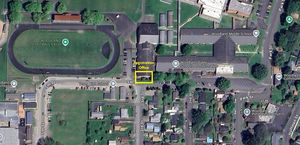
How to Find Us -
We are located at the corner of 3rd and 5th streets, by the Woodland Middle School Track.
-medium.jpg)
How to Register your Student
Step 1: Gather Required Documentation
Prior to registering your student, please gather the following documentation. This information is required in order for your student to have a complete registration:
- Proof of Address
- Birthdate Verification
- Immunizations
- Transcripts (High School Only)
For additional information on acceptable documents for each of these items, please click Here.
Step 2: Determine Which School Your Student Belongs to, if Elementary
Click Here for an Elementary boundary map for Woodland. Please note this map is for illustration purposes only. Official school designation will be made by the registrar upon receiving completed registration paperwork.
Step 3: Complete Student Registration Paperwork
Registration can be completed in two ways:
- Complete our Online Registration -- Coming soon for 26-27 Registration!
2. Complete a Paper Registration Packet - If choosing to complete a paper packet, please request that one be prepared for you in advance by clicking below. Please wait 24 hours after submitting the request to come pick the packet up.
- To request a packet for the 25-26 school year: Click Here
- To request a packet for the 26-27 school year (Link will be available March 16th!)
Remote Learning - Lewis River Academy (LRA) and TEAM High School
Our two alternative programs require that a supplemental application be turned in, in addition to the main district enrollment. If applying to one of these programs, please fill out and return the applicable packet below.
Step 4: Submit Registration Paperwork
- Online registration is submitted electronically. Parents will be notified via e-mail once their registration has been processed and their student is enrolled.
- Paper enrollment packets can be returned directly to the Student Registration/Business Services Office Monday-Friday from 8:00 am to 4:00 pm. Our office is located at 800 Third St, Woodland, WA 98674. The registration office also has a 24-Hour Drop Box located in front of the Business Services Office, where paper registration packets may be dropped off.
How to Get Started with Online Enrollment for 26-27 Registration
Woodland uses the Skyward (Qmlativ) Family Access area to process new student enrollments. Once family access credentials are assigned, families will use those credentials to both enroll their student and view student attendance, report cards, conferences, and more, once their student is enrolled. Follow the instructions below to get started. For detailed notes and tips on navigating online enrollment, click the link below.
Guide to New Student Online Enrollment
Families New to the Woodland School District
- If you are brand new to the district, please establish a login for Online Enrollment/Family Access and then proceed through the online registration steps. Use the links below to access instructions and begin online enrollment:
Families who Currently Have Students Enrolled in the District:
- If you have a child currently enrolled in the Woodland School District, in order to register a new student, please log into Qmlativ Family Access and choose the New Student Enrollment option located in the dropdown list next to the house. On the next screen, click on the New Student Enrollment Tile to begin the process. Click Here to go to the Family Access login page.
Families Previously Enrolled in the Woodland School District:
- If your student has been previously enrolled with the district please click Here to be taken to the family access login page. If you know what your Family Access credentials were, use them to log in. Otherwise, if you have forgotten your credentials, on the Family Access login page, choose the Forgot your Username or Password link to retrieve your login information via e-mail. Once you have received your credentials, log into Family Access and proceed as noted above using the New Student Enrollment Option. If you are not successful in gaining credentials, follow the new to the district instructions above to establish new login credentials.